Use case · multiple AI agents, Claude Code in a team
Several people, several consoles, one plan board.
Each person in the team connects their own Claude Code, Codex or Cursor, and all the consoles take plans from the same board. The plan’s card shows who is working on it and with which console, dependencies set the order, and each person’s rights say what their consoles may do.
Each person connects their own consoles, up to 10 at once. A console acts with its person’s rights, and an administrator grants rights on the People screen.
One board
Many consoles, one board. Each plan is taken on by one of them.
The card shows who is working on it
When an agent takes a plan on, the card moves to the column marked in realization and shows the person, their console and a short note the console may give itself, such as the computer, repository and branch. Two consoles won’t take on the same plan: the second is refused with the name of the one already working on it.
- Each person names their consoles, backend for example, and that name goes into the signatures
- A backlog plan a person is responsible for is taken on by that person’s console and no other
- The agent’s notes and questions go into the plan document
People set the order
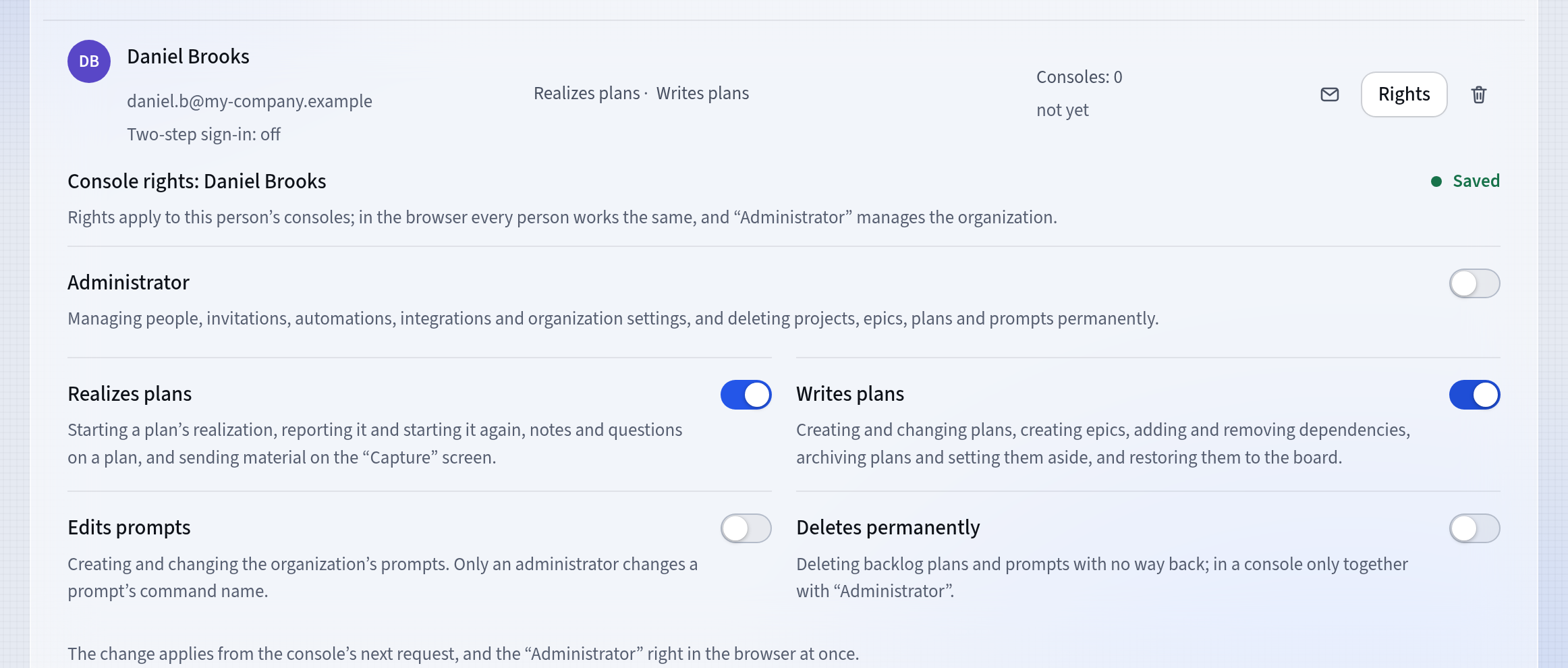
The Waits on… dependency says which plan must be delivered before another. An agent gets the next plan in board order, one that waits on nothing and that nobody else is responsible for. The agent chooses neither the columns nor the order of the cards: people set them.
- Epics group plans, and the Order screen shows what is ready to start
- A console won’t start a plan that waits: the server refuses
- A card dragged higher reaches an agent sooner
Rights and reports
Each person has their own rights. Reports need no setup.
Each person’s console rights
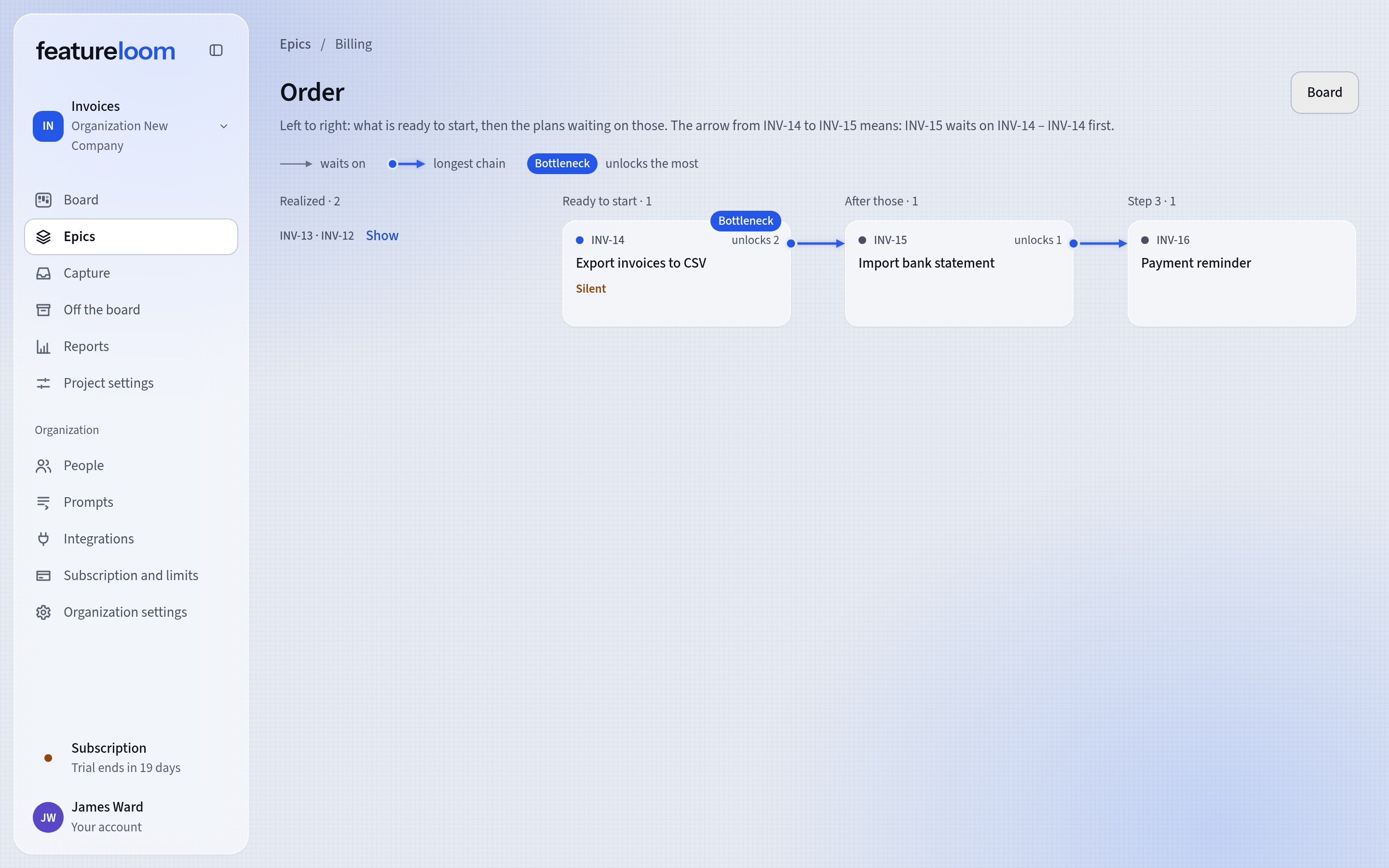
An administrator invites people on the People screen and grants them console rights: Realizes plans, Writes plans, Edits prompts and Deletes permanently. By default a new person has Realizes plans. Consoles act with their person’s rights, and the server refuses a call outside them.
- A change of rights applies from the console’s next call
- In a console, deleting permanently also needs the Administrator right
- A person gives the acceptance verdict in the app, never a console
Reports with no setup
Reports show what was delivered and accepted, who did it and what people are waiting for. featureloom counts them from the board, and nothing has to be set up. The Who realizes part lists people, their consoles and automations by name, not by the number of plans. Every person sees the reports, and an administrator also sees the cost of featureloom’s AI model.
- Waiting for acceptance lists the oldest undecided plans at the top
- Questions from realization counts open questions and the time to an answer
- Plan events can go to the organization’s Slack channel
How you start
A team on one board in three steps.
Invite people
In the menu, open People and press Invite person. Type their email address and choose the console rights: by default a new person has Realizes plans.
Each person connects their consoles
Each person opens Integrations and connects their own Claude Code, Codex or Cursor on the Your consoles card. Anyone who runs several Claude Code consoles as the same computer user presses Show advanced in the connect window, then Copy the folder’s connect command, and pastes it in the folder where they start that console.
Agents take plans in turn
Each agent gets the same command with the Realizer prompt. It takes the next ready plan, and when two reach for the same one, just one of them takes it on.
An administrator changes console rights at any time with the Rights button beside the person, on the People screen.
Tutorial: Your consoles, several at onceQuestions about several agents in a team
Can two consoles take the same plan?
No. Two consoles that ask for the next plan at the same moment may be offered the same one, but just one of them takes it on. The other is refused with the name of the one working on it and can ask for the next.
How many consoles can one person connect?
Each person has up to 10 live consoles at once in an organization, at no extra cost in featureloom. You pay for Claude Code, Codex and Cursor themselves with their providers. When a person connects one more console past the limit, featureloom disconnects the one they have not used for the longest time.
Can a team have an agent that works with no person behind it?
Yes. An administrator creates an automation: a separate account of the organization for unattended jobs, with its own rights and a key valid until a set date. Its signatures carry the automation’s name, not a person’s. Read more on the An automation on a server page.
Who accepts the agents’ work?
A person in the app, with Accept or Do not accept in the Acceptance section. The verdict stays in the plan with the reasons, the date and the person who decided. The server refuses a verdict sent from a console or an automation. Agents can also plan the project themselves, with epics and plans in order, while the decisions stay with people. Read more on the AI project management page.
One board for people and their agents.
30 days free, no payment card needed. You invite people, and each of them connects their own consoles.